
Keep Elementor cache fresh without clearing everything
When shared Elementor content changes, Cache Autopilot PRO works out where it is reused, nested or assigned through Display Conditions, then refreshes and preloads the affected frontend pages automatically.
v4.3 compatible
Includes Atomic Default Styles, Loop Item templates including alternate Loop Grid templates, and changes made through Elementor MCP.
30-day money-back guarantee.
Safe to try. Safe to remove.
For Elementor sites using supported cache plugins.
Works with Elementor Free and Pro;
Elementor Pro features are handled when present.
Refresh the pages actually affected
Shared Elementor content can appear across many pages. When that content changes, clearing the entire cache is safe — but it also makes unrelated pages cold.
Cache Autopilot finds where the changed Elementor content is used, purges those URLs, and leaves unrelated cached pages untouched.
For example, update a Component that is reused across multiple pages — even when it is nested inside another Component — and Cache Autopilot resolves the affected frontend pages and refreshes those pages instead of flushing the whole site.
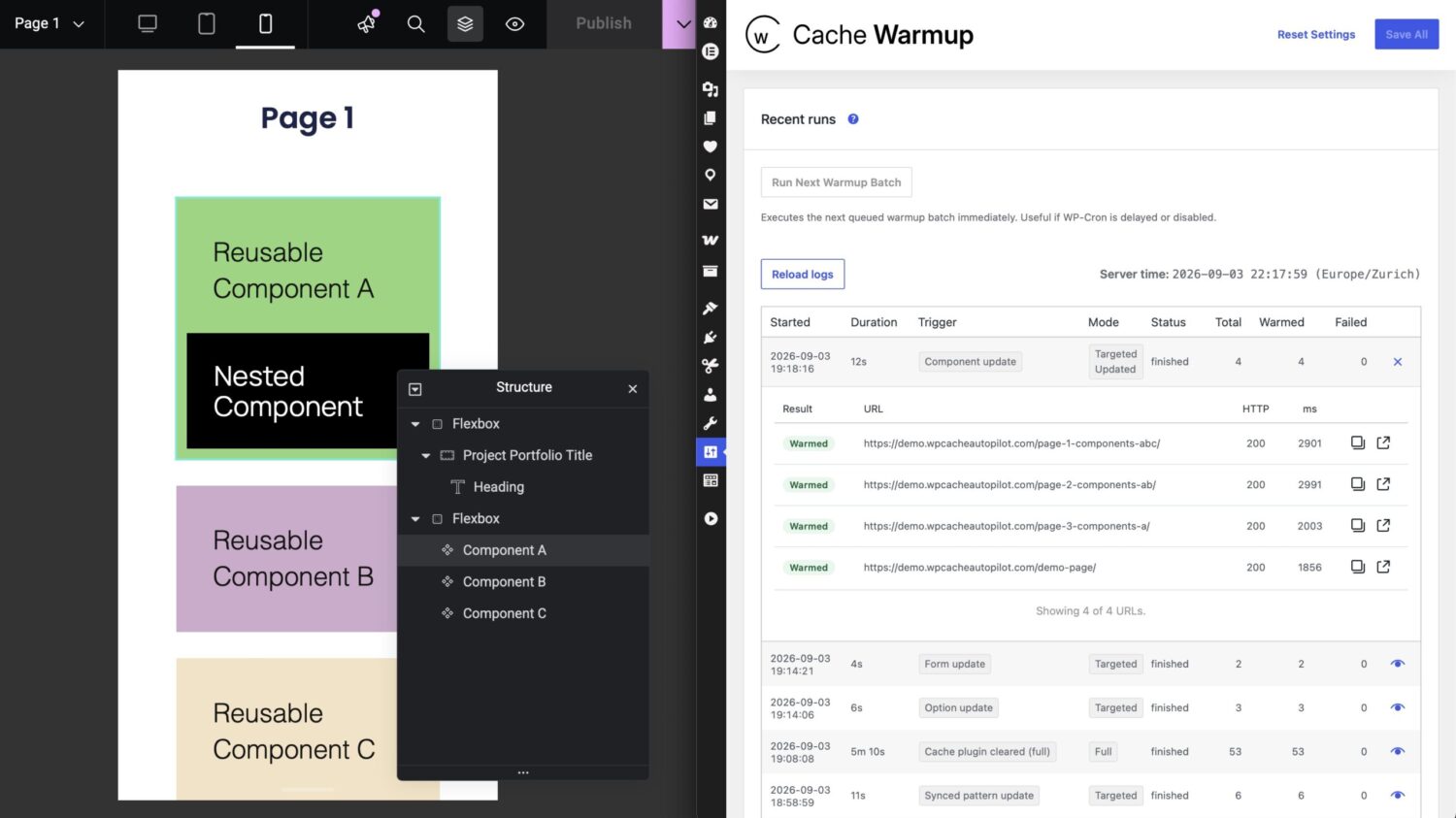
If the affected pages cannot be determined safely, Cache Autopilot broadens the refresh rather than risk leaving stale content behind.
Built for shared Elementor content
The Elementor integration supports:
- Components (Atomic Editor)
- Global Widgets and Template widgets
- Atomic Default Styles (Elementor 4.3+)
- Saved Templates
- Theme Builder site-part templates
- Loop Item templates, including alternate Loop Grid templates
- Floating Elements and Popups
- Nested references
- Display Condition resolution
No custom code is required for standard Elementor setups.
Works with Elementor MCP
Elementor 4.3 lets AI tools such as Claude Code, Codex and Cursor create and modify Elementor content through Elementor MCP.
Cache Autopilot detects changes made through Elementor MCP and resolves the affected frontend pages just as it does for changes made in the Elementor editor — including reusable content, templates and Display Conditions.
No additional Cache Autopilot configuration required.
You build the site.
You configure the plugin.
You hand it over.
Client publishes.
The right pages refresh.
Works alongside your cache plugin
Cache Autopilot works alongside supported cache plugins rather than replacing them. It adds the context needed for targeted cache refresh.
- LiteSpeed Cache (free) – setup notes
- WP Rocket
- WP Fastest Cache (free) – requires 1.5.2+
- WP Optimize (free)
- Speed Optimizer (free) – setup notes
- FlyingPress
- SpeedyCache (free)
- Breeze (free)
- Cache Enabler (free)
Can’t find your plugin?
Support depends on reliable URL-level purging. Some widely used cache plugins are not listed because they do not expose a suitable purge API.
More integrations and PRO features
Alongside the Elementor integration, Cache Autopilot also supports:
- WooCommerce (Free)
- ACF relationship propagation
- Multilingual support
- Timed invalidation
- Access-control role/user overrides
- Custom relationship discovery for custom fields and data models
See what’s already included in Free.
Have a question?
Whether it’s about compatibility, a feature you need, or something the product doesn’t cover yet — reach out. Questions are welcome before purchase.