
Cache Autopilot – Documentation
Cache Invalidator
Updated:
Overview
Cache Invalidator is the invalidation decision engine of the Cache Autopilot plugin. It monitors WordPress content changes, determines which cached pages are affected, purges those entries via the active cache adapter, and emits a normalized URL list for downstream consumers.
Key capabilities:
- Configurable Post Types that map content changes to target pages
- Relationship traversal across connected content (strategy-based, framework-agnostic)
- Archive URL resolution (post type and taxonomy archives)
- Policy-driven multilingual fanout (WPML, Polylang, TranslatePress)
- Async deep invalidation to defer complex relationship traversal and invalidation planning to background processing
- Timed invalidation schedules
- Global invalidation toggles for presentation-layer changes
- Relationship graph traversal across related Post Types for precise invalidation of connected content structures.
Configuration Concepts
Post Types define where invalidation originates. Enabled Post Types can define targets and rules, while other Post Types can still participate through Content Relationships.
Target Pages define which frontend pages should be invalidated when content changes. Different targeting modes allow precise or broad invalidation depending on site structure.
Content Relationships define how changes propagate between related Post Types.
Additional invalidation rules extend invalidation beyond direct content relationships.
Configuration separates three concerns:
Where changes originate → Post Types
How content is connected → Content Relationships
Which pages are affected → Target Pages
Settings Reference
All Cache Invalidator settings, organized by admin UI panel.
Settings Tab
General
- Master switch — controls whether cache invalidation runs. Keep enabled; disable temporarily during bulk imports or migrations.
Post Type Tabs
Define which content types actively participate in cache invalidation. Enabled Post Types get their own configuration tab where target pages and invalidation behavior can be defined.
Both public and non-public Post Types can be enabled, with non-public Post Types having fewer options in their own tab.
Disabled Post Types remain available as dependencies but do not manage their own invalidation rules.
Timed Invalidation
PROThis feature is available in Cache Autopilot PRO.
Schedule automatic cache purges at specific times. Each rule specifies a time (24h format) and target mode.
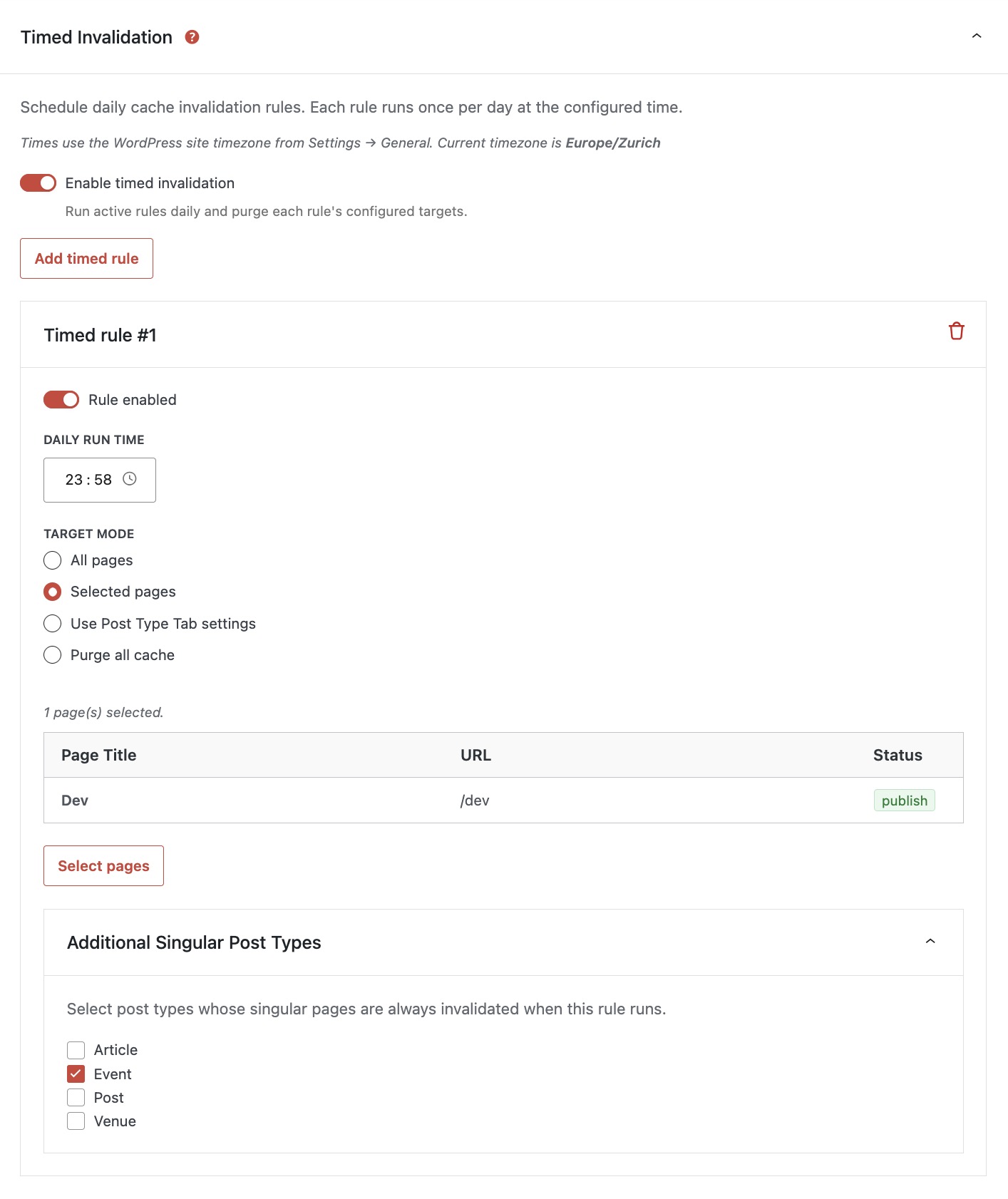
Best suited for content updated on external schedules (event feeds, stock tickers) or periodic freshness maintenance.
Timed invalidation depends on WP-Cron. On sites with low traffic, consider using a server-side cron job to trigger wp-cron.php reliably.
Target Mode
All pages – purges all published pages.
Selected pages – select the pages that should be purged.
Use Post Type Tab settings – select a post type that has its own tab in order to reuse the configuration (targets, archives, expansion).
Does not include relationships or change-based logic.
Purge all cache – select this option if the element is visible on the entire site (e.g. a footer event list).
Additional Singular Post Types
Allows you to purge all singular pages of selected post types when this post type changes.
Only available in All pages and Selected pages target mode.
Use Case:
An Event overview page (e.g. /events) displays a list of events, and each Event detail page may also show related or latest events.
By selecting the overview page under Target Pages and enabling Additional Singular Post Types → Event, the overview page and all event detail pages are invalidated when the timed invalidation runs, keeping all listings in sync automatically.
If your post type uses post type archives and taxonomy archives, use the Use Post Type Tab settings target mode instead, and make sure to enable the options in the Archive Targets panel.
See: Troubleshooting → WP-Cron Not Running for cron execution troubleshooting.
Theme & Archive Changes
Site-wide events that affect frontend presentation trigger invalidation across all enabled Post Types.
Theme & UI Surface
Controls invalidation for theme-level and navigation changes.
- Menu changes — purges cache when a menu or menu location is modified.
- Customizer changes — purges cache when Customizer settings are saved.
- Theme switch — purges cache when the active theme is changed.
- Navigation updates — purges cache when navigation blocks (
wp_navigation) are updated.
All enabled by default. Disable only if your theme does not use a specific feature.
Patterns & Widgets
Handles invalidation for widget changes and synced pattern updates. Each feature includes an optional fallback that broadens invalidation when specific page mapping cannot be confidently resolved.
- Widget changes — purges cache when widgets or sidebar layouts are modified. Uses sidebar-to-page mapping when available, then falls back to layout template resolution.
- Widget fallback — when specific sidebar-to-page(s) mapping is not available, includes configured target pages as fallback targets. Disable only if you have configured explicit sidebar-ti-page(s) mapping via
ekesto_ci_widget_selectorsand want strict-only invalidation. Important: Your cache plugin may trigger “clear all cache” when a widget changes. In such a case you’d have to disable the cache plugin’s behaviour. - Synced Pattern changes — detects which pages reference a changed synced pattern (
wp_block) and purges those pages. - Synced Pattern fallback — when the plugin cannot confidently resolve all pattern references, runs broader invalidation. Only activates when uncertainty is detected — confident resolution does not trigger fallback.
All enabled by default. Keep fallback toggles on unless you have explicit mapping configured and want to minimize purge scope.
Content Triggers
Handles invalidation for non-post content changes.
- Comment changes — purges configured targets when comments are added, edited, moderated, or deleted on published content. Disabled by default; enable on sites where comment counts or recent-comments sections are cached.
- Form changes — detects changes in supported form plugins (Contact Form 7, Gravity Forms, Ninja Forms) and purges pages that embed the changed form. Enabled by default.
- Form fallback invalidation — when the plugin cannot confidently resolve which pages embed a changed form, runs broader target invalidation. Only activates when resolution is uncertain. Enabled by default; keep on unless all forms resolve cleanly.
Multilingual Fanout
PROThis feature is available in Cache Autopilot PRO.
Controls whether invalidation extends across all active languages on multilingual sites (WPML, Polylang, or TranslatePress). No effect on single-language sites.
- Post-trigger multilingual fanout — when a post or custom post type changes, extends invalidation to all active languages instead of only the changed post’s language. Disabled by default; enable if translated content shares layout elements or listing pages that must stay in sync across languages.
- Global trigger multilingual fanout — when non-post events fire (presentation changes, timed rules, forms, comments, metadata, taxonomy terms), extends emitted URLs to all active languages. Enabled by default. Disabling may leave translated pages stale after site-wide changes.
WordPress Settings
Determines whether archive URLs and WordPress settings changes are included in invalidation.
- Reading settings changes — purges cache when the front page or posts page assignment changes in WordPress Reading settings.
- Permalink structure changes — purges cache when the permalink structure or taxonomy URL bases change.
All enabled by default. Archive URLs are a common source of stale content after post changes.
Invalidation Behavior
- Async deep invalidation — defers deep invalidation planning (relationship resolution, archive discovery, and target expansion) to background WP-Cron processing.
- Async delay seconds — delay before background processing starts. Increase when rapid successive saves cause queue contention. The default (5–10 seconds) works well for most sites.
Enable Async deep invalidation for sites where complex invalidations slow down the editor save experience.
Access Control
PROThis feature is available in Cache Autopilot PRO.
Decide who can manage Cache Autopilot on your site. Administrators always have full access by default.
Access is simple: either someone can manage the plugin or they can’t. No partial access, no confusing limitations.
Role Access (Baseline)
Choose which roles should have access.
For example, you can allow Editors to manage the plugin without giving them general WordPress admin rights.
User Overrides
Add specific users to give them access individually. This is useful when you only want certain people to manage the plugin.
User settings always take priority over role settings. Remove a user to take away their access again.
Menu Behavior
Any user with access will see Cache Invalidator and Cache Warmup under Settings.
Support & Debugging
Support debug mode writes diagnostic entries to a downloadable log file. Useful when troubleshooting on hosts without PHP error log access. Enable only during troubleshooting; disable when done.
See: Support Debug Mode for more detailed information.
Post Types Tab
Target Pages
Target Mode
- Selected pages invalidates specific pages.
- All pages invalidates every published page.
- Purge all cache runs a full cache purge and emits broad invalidation URLs.
“All pages” and “Purge all cache” both trigger broad invalidation. “Purge all cache” is the most expensive option because it runs a full adapter purge. Prefer precise targets whenever possible.
Content Relationships
PROThis feature is available in Cache Autopilot PRO.
Defines how changes propagate between Post Types. When a related post type changes, Cache Invalidator follows configured relationships (currently supports ACF relationship fields) to discover affected content and automatically invalidate the correct frontend pages.
This enables precise invalidation across connected content instead of relying on broad cache purges.
If any affected Post Type is configured for Purge all cache, the entire event escalates to global invalidation.
To extend the relationship resolution engine when relationships are stored outside automatically detected systems, use the following filter:
See: Developer Reference → Filters → ekesto_ci_relationship_meta_keys
Additional Singular Post Types
Allows you to invalidate all singular pages of selected post types when this post type changes.
Use case
An Event detail page displays a list of other events (e.g. “latest events”). When one event is updated, those lists on other event pages can become outdated.
By enabling Additional Singular Post Types → Event, all event pages are invalidated whenever an event changes, keeping all listings in sync automatically.
Post Type Archive
- Refresh post type archive — refreshes this Post Type’s archive URL (e.g.
/blog/,/products/) when affected content changes. - Include paginated pages — also refreshes additional archive pages. Pagination depth defines how many pages beyond the main archive are included.
See Paginated archive warmup for more details.
Taxonomy Archives
- Refresh taxonomy archives — refreshes affected taxonomy term archives (e.g.
/category/news/). Tag archives require Include tags under Taxonomy Behavior.
Only publicly queryable taxonomies are included.
- Include paginated pages — also refreshes additional taxonomy archive pages according to the configured Pagination depth.
See Paginated archive warmup for more details.
Taxonomy Behavior
- Taxonomy propagation — includes taxonomy term archive URLs in invalidation. Enable when term archive pages should refresh on content changes.
- Include tags (post_tag) — allows tags to participate in invalidation and archive expansion. Enable when tag changes and tag pages should trigger updates for this post type.
Changes to tag settings apply to future warmup runs. Already queued background jobs may still run until the queue is processed.
Date Archives
Available only for native Posts.
- Refresh date archives — refreshes affected year, month, and day archives and includes them in full warmups. If a Post’s publication date changes, both the old and new date archives are refreshed. Requires pretty permalinks.
- Include paginated pages — also refreshes additional date archive pages according to the configured Pagination depth.
See Paginated archive warmup for more details.
Paginated archive warmup
Cache Autopilot does not try to calculate the exact number of pages in each archive. Although native archive pagination normally follows the WordPress Settings → Reading value, themes and plugins can modify archive queries. Pagination is therefore processed up to the configured depth and stops automatically at the first page that does not exist.
Pagination depth defines how many additional pages beyond the main archive are refreshed.
For native archive pagination, the number of posts per page is normally controlled under Settings → Reading → Number of recent posts shown on archive pages.
When using a Query Loop block in an archive template, keep Query type set to Default so WordPress uses that native archive query and pagination (e.g. /page/2/).
Custom Query Loops use their own pagination and are not covered.
Paginated pages are warmed after the main archive targets and run last during full warmups. Cache Autopilot stops pagination for an archive at the first page that does not exist; that page is reported as Not found, while deeper pages are not requested.
Content Change Detection
Cache Invalidator listens to WordPress lifecycle hooks to detect content changes. Each listener evaluates relevance based on configured Post Types and global toggles.
Post Lifecycle Events
The core invalidation engine monitors post state transitions:
- First publish
Post transitions topublishfor the first time (including scheduled posts). Triggers invalidation for all configured Post Types related to that content. - Update
An already-published post is saved. Triggers invalidation for affected Post Types. - Deletion
A published post is permanently deleted. Triggers invalidation for affected Post Types. - Untrash
A post is restored from trash. Triggers invalidation for affected Post Types.
Taxonomy Changes
Taxonomy events trigger invalidation for posts associated with the changed terms:
- Term assignment (
set_object_terms)
When terms are added to or removed from a post. - Term edit (
edited_term)
When a term’s name, slug, or description changes. - Term deletion (
delete_term)
When a term is removed.
Only taxonomies registered to configured Post Types are monitored. Taxonomy archive URLs are included when the taxonomy archives toggle is enabled.
Presentation Layer Changes
Presentation changes affect the entire frontend and trigger invalidation across all enabled Post Types. Controlled by global toggles.
- Theme customizer saves
- Menu creation, update, and deletion
- Widget area assignment changes
- Reading settings changes (homepage, posts page)
- Permalink structure changes
- Theme switches
Additional WordPress hooks can be registered as full-site invalidation triggers via filter. The trigger map is evaluated at runtime, so late-loaded plugins can register triggers.
See: Developer Reference → Filters → ekesto_ci_global_triggers and ekesto_ci_presentation_trigger_enabled for advanced customization.
Comment Changes
When the comments toggle is enabled, comment lifecycle events trigger invalidation:
- New comment insertion
- Comment content edits
- Comment status transitions (approval, moderation)
- Comment deletion
Invalidation targets the comment’s parent post and the configured target pages for affected Post Types.
Meta Changes
Meta change detection is filter-driven. By default, no meta keys are monitored. A filter defines which post types and meta keys should trigger invalidation when post meta is added, updated, or deleted.
- Exact key match:
'_price'matches only_price. - Prefix match:
'custom_field_*'matches any key starting withcustom_field_.
Monitored hooks: added_post_meta, updated_post_meta, deleted_post_meta. Only fires for published posts.
See: Developer Reference → Filters → ekesto_ci_meta_change_post_types for advanced customization.
Form Changes
When the Forms toggle is enabled, Cache Invalidator monitors supported form plugins for changes. When a form is created, updated, or deleted, it scans published pages to find where the form is embedded and purges those pages.
Resolution follows two paths:
- Precise match
When form references are detected in content or builder data, only those specific pages are invalidated. - Fallback
When resolution is uncertain (for example very large scans or ambiguous matches), all configured target pages are invalidated.
This behavior is controlled by the Forms fallback setting. Form detection is automatic — when a supported form plugin is active, Cache Invalidator registers the necessary integration.
See: Supported Integrations → Form Adapter Compatibility for supported form adapters and technical details.
Async Deep Invalidation
For complex relationship graphs, synchronous resolution can be expensive. Async deep invalidation defers relationship propagation and full invalidation planning to a background WP-Cron job to keep editor saves fast and predictable.
When enabled:
- The immediate invalidation (trigger post and directly affected targets) runs synchronously.
- Deep relationship resolution and full invalidation planning are enqueued to an option-based async queue.
- WP-Cron fires the processor after a configurable delay.
- The processor prepares the full invalidation plan, resolves relationships, purges targets, and emits a single consolidated URL list.
Key behaviors:
- Editor performance protection
Expensive relationship resolution and sitemap analysis never run during editor saves. Full invalidation planning happens only inside the background processor. - Deduplication
Duplicate triggers are automatically merged to avoid redundant invalidation work. - Deterministic planning
The processor builds a stable invalidation plan before execution so settings or additional triggers cannot cause inconsistent results during processing. - Queue cap
The queue holds a maximum of 200 items. Oldest items are dropped if the cap is exceeded. - Single emission
The processor emits one consolidatedekesto_ci_invalidation_urlsaction after processing all queued jobs, rather than one per job. - Lock protection
A transient-based lock (120s TTL) prevents concurrent processor runs.
See: Cache Warmup → Batch Execution and Pacing → WP-Cron Timing for cron execution considerations.
Multilingual Support
PROThis feature is available in Cache Autopilot PRO.
Cache Invalidator automatically detects multilingual plugins and includes translated URLs during invalidation based on the configured fanout policy.
Fanout behavior is controlled in Global Invalidation settings:
- Post triggers: default Off (same-language updates only)
- Non-post triggers: default On (all languages when translations can be resolved)
The active multilingual plugin is detected automatically.
See: Supported Integrations → Multilingual Compatibility for the list of supported plugins.
Post Target Mapping
Post target mapping overrides which pages are invalidated when a specific post changes. Useful for non-public post types that should trigger invalidation of specific pages, or for public post types that need additional targets beyond their Post Type configuration.
See: Developer Reference → Filters → ekesto_ci_post_selectors for advanced customization.
Support Debug Mode
Support debug mode records what the system is doing so support can quickly understand unexpected behavior. Instead of relying on the PHP error log (often inaccessible on shared hosting), it creates a downloadable log file directly inside WordPress.
How it works
Enable Support Debug Mode in Cache Invalidator → Support & Debugging. The switch works immediately — no save required.
When enabled, both Cache Invalidator and Cache Warmup write to the same shared log file.
Log File Controls
The log panel lets you manage the file directly:
- Download → save the log to send to support
- View → quickly inspect recent activity
- Refresh → toggle if view icon is still disabled and file size is 0 despite enabled logging
- Delete → remove the current log (a new one is created automatically) – does not disable logging
Automatic housekeeping
- Large files are rotated automatically
- Old logs are removed after 7 days
- Disabling debug removes the active log
Developer Extensions
Cache Invalidator exposes hooks and filters (customization hooks) for advanced customization. All extension points are documented in the Developer Reference.
See: Developer Reference → Filters for the complete hooks and filters reference.